

Introducing Frame Bench: read, edit and build packet captures at the byte level
Read, edit, and build packet captures at the byte level: open one you have, or make one from nothing.
We empower businesses with cutting-edge software and expert services to navigate the complexities of today's cyber landscape. Secure your network with cutting-edge software and services that ensure your safety and peace of mind!
Introducing Frame Bench
Every network engineer, incident responder and protocol developer has been here. You have a capture. It is almost what you need. One address has to change. A checksum is wrong. You want the same request, but with one header missing. You want to know why a connection stalled. You want to read the traffic inside an HTTPS session you can prove is yours.
Viewing a capture is a solved problem. Changing one, repairing one, and building the traffic you wish you had captured is where the afternoon goes: a script here, a hex editor there, a one-off tool that nobody will ever open again.
Frame Bench is the workbench for that second half of the job. It runs on your computer, it opens .pcap and .pcapng files, and it treats every frame as something you can read, edit and build.
What it is
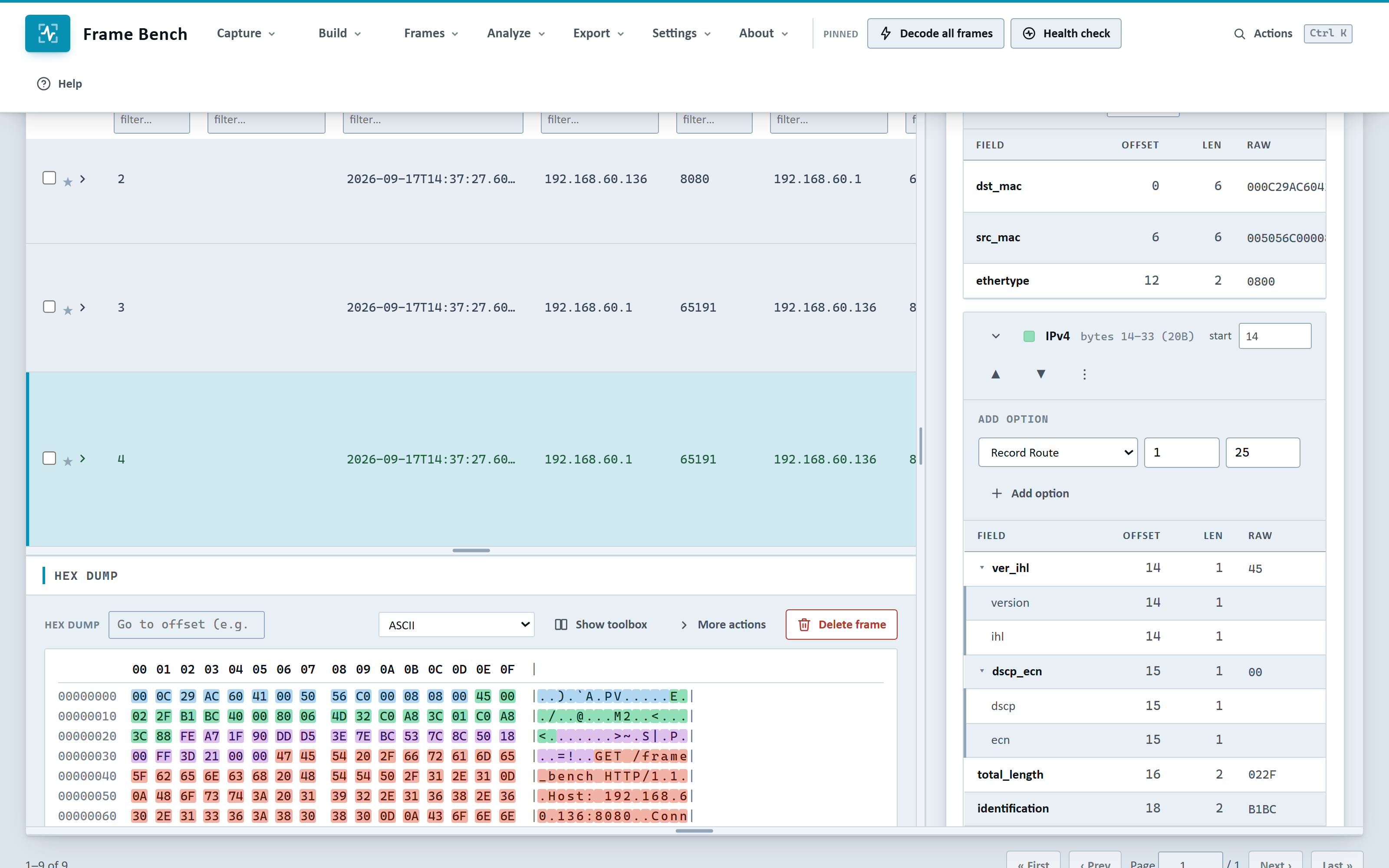
Frame Bench is a desktop application for Windows and Linux. You open a capture and every frame is laid out layer by layer: Ethernet, IP, TCP or UDP, and the application protocol on top, down to the individual fields and the bytes behind them. From there you can:
Read a capture, search it with expressions, and ask it what looks wrong.
Edit any byte and watch the decode follow.
Repair a damaged capture in one click.
Build frames, streams and whole conversations from nothing, with correct lengths and checksums.
Decrypt TLS, DTLS and QUIC from a key log and read the traffic inside.
Export the result as a capture another tool can open, or as a report you can hand to a colleague.
None of it needs a server, an account or a network connection once the app is activated.
Read and understand a capture
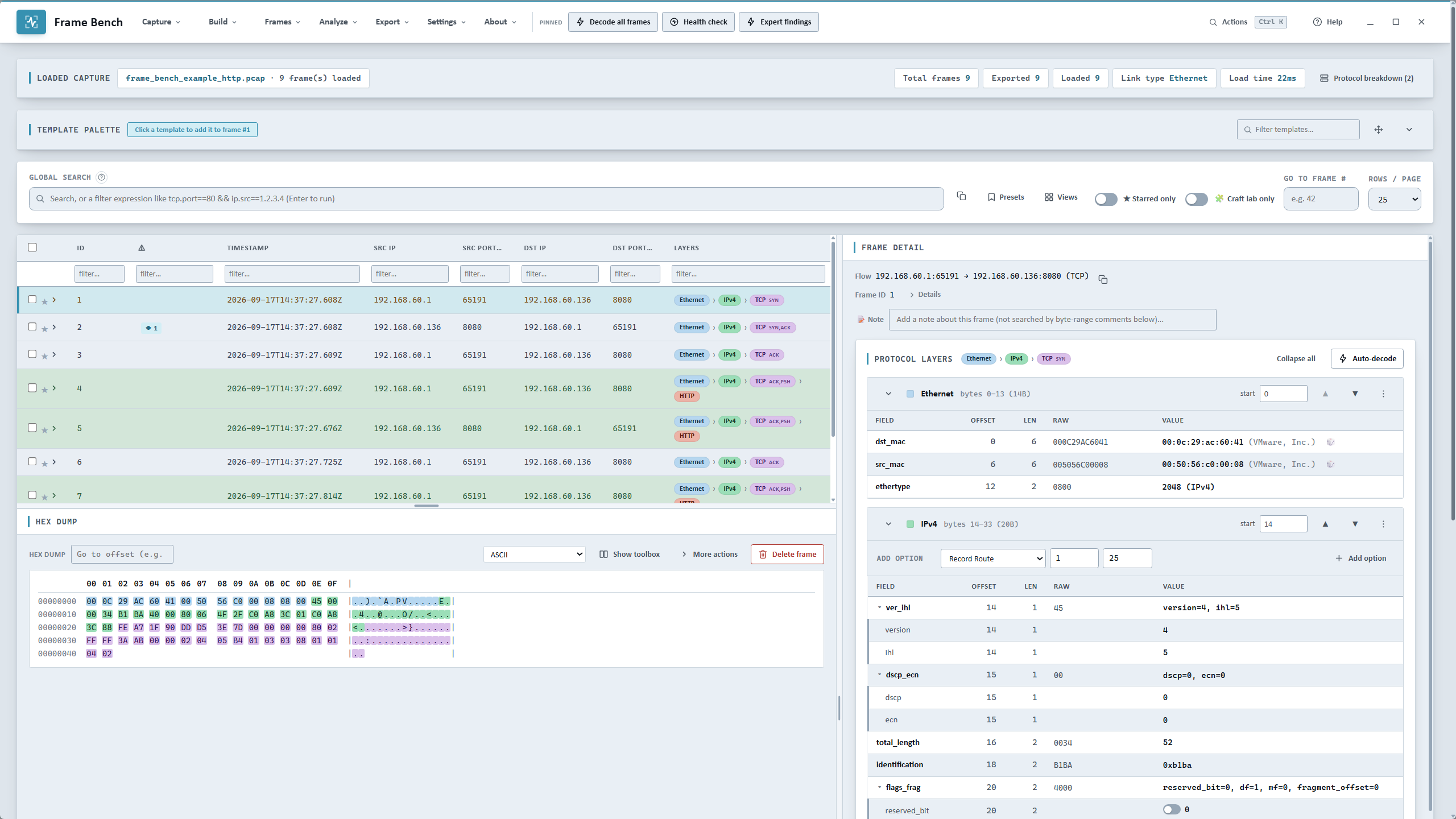
The frame table is where you start. Columns are yours to choose, coloring rules mark what matters, and every frame can be starred and annotated with a note. The detail pane beside it shows the decode of the selected frame, and you can float any pane into its own window when a second monitor is free.
Filter expressions replace the dialog of boxes. Type tcp.dstport==80 && frame.len>100 or dns.qname contains "example", with suggestions for fields, operators and values as you type. Then pull every distinct value of a field out of the capture, counted, with the frames each came from: every DNS name, every destination address, every user agent.
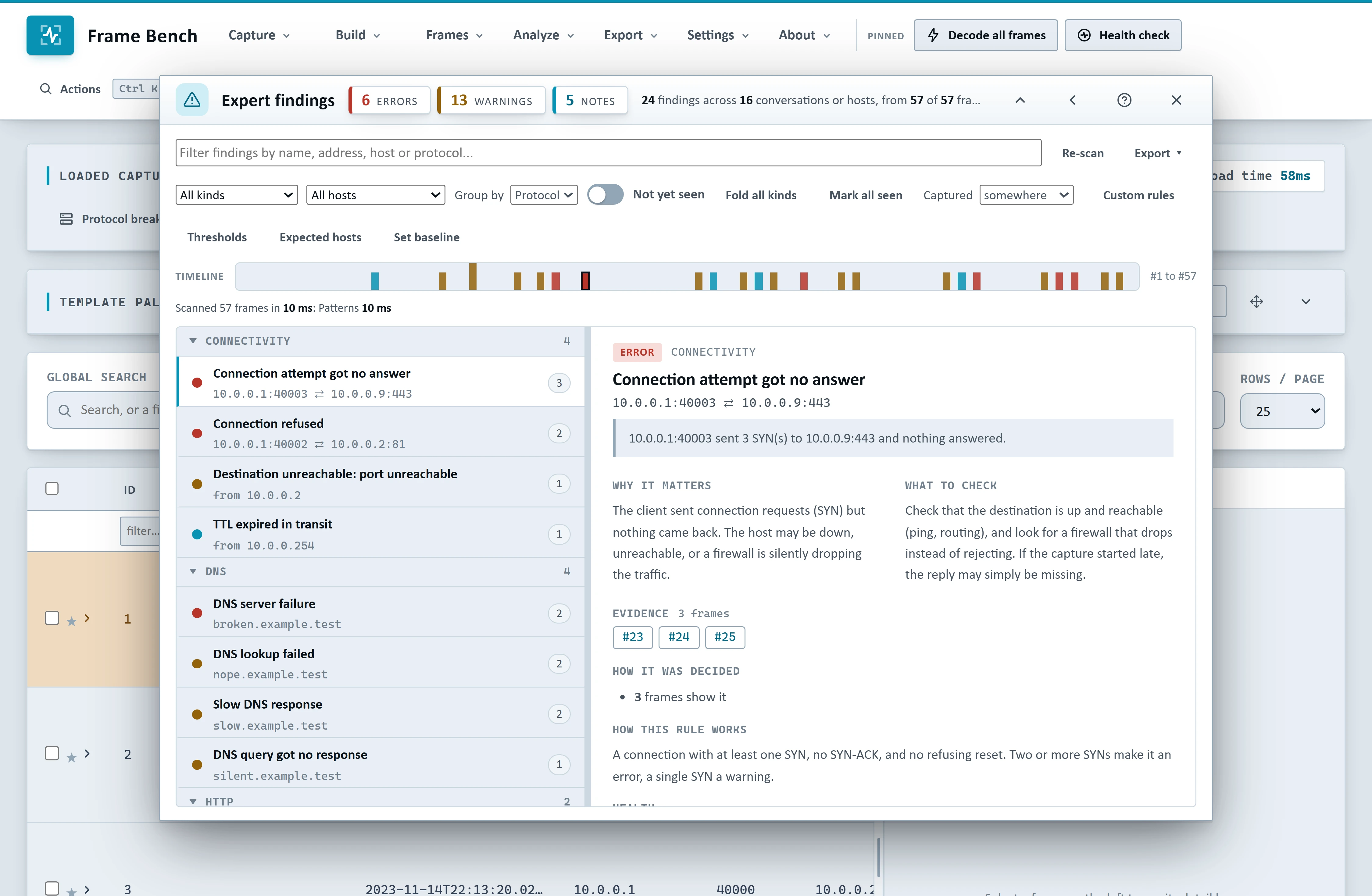
Expert findings reads the whole capture and tells you, in plain words, what looks wrong: a connection that got no answer, a refused connection, a slow DNS response, a reset, duplicate ACKs, a TLS alert. Each finding says why it matters, what to check next, and shows the frames as evidence. Regroup by protocol, host or severity. Write rules of your own from any search expression, or point Frame Bench at a folder of rules. A set for DNS tunnelling, network hygiene and SMB security is included.
Graphs and streams show the shape of a conversation. Stream graphs draw throughput each way and the round-trip time of every acknowledged segment. The ladder diagram draws the same exchange frame by frame, with retransmissions flagged. RTP streams report loss and jitter for a call.
Edit and repair
Double-click any byte in the hex dump and retype it. The decode updates at once, undo and redo step through every change, and a frame you have changed is marked until you revert it. Chain operations over a selection (add, XOR, shift, rotate), grow a frame, and write a note on the frame explaining what you did and why.
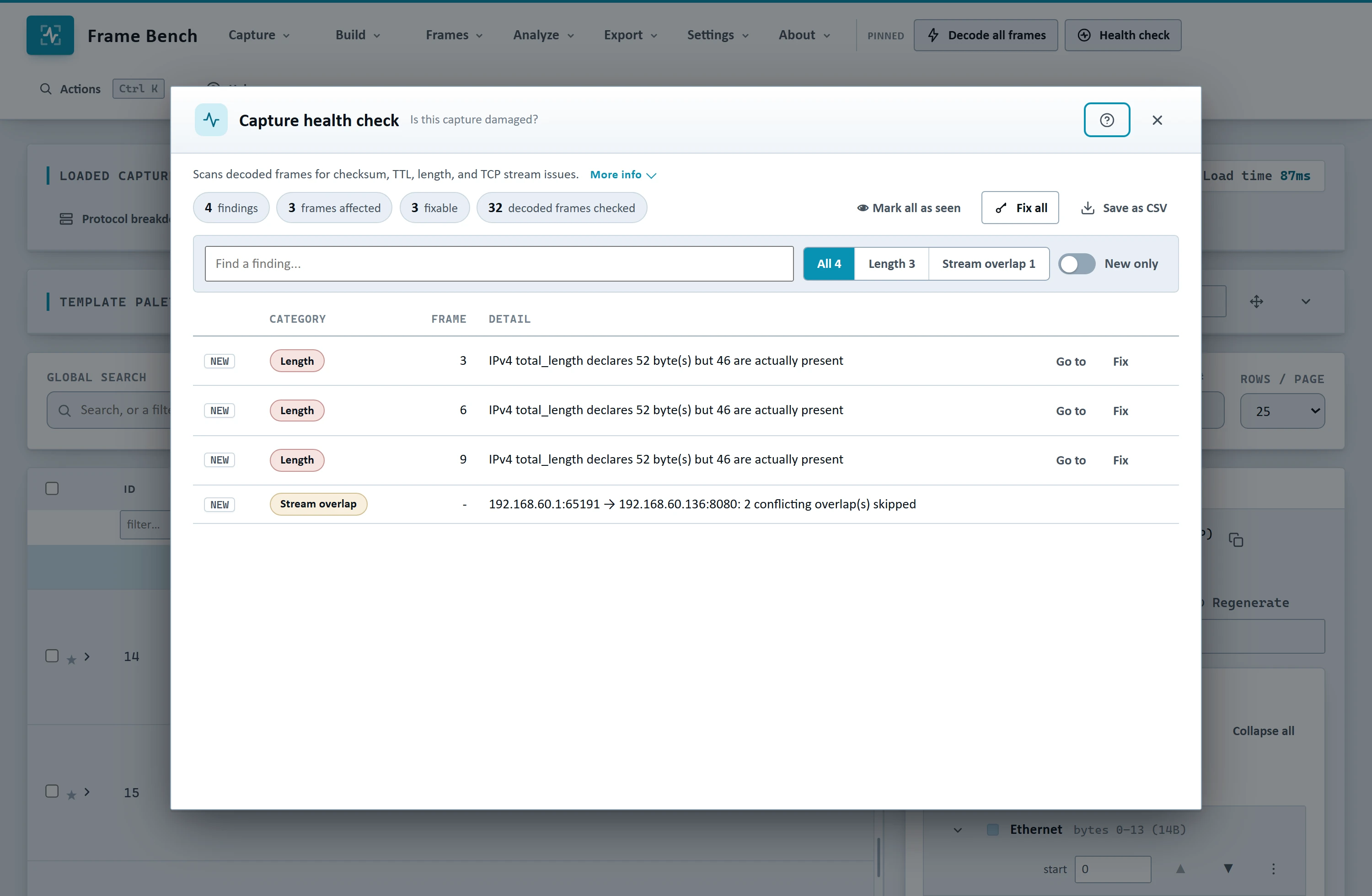
The Health check scans a capture for invalid checksums, lengths that do not match, expiring TTLs and gaps in a TCP stream, and Fix all repairs what can be repaired. Rewrite addresses moves a whole capture to a new network: MACs, IPs, ports and VLAN IDs, with rules that can follow a single stream, and every checksum recomputed. Batch apply runs one change across many frames, for example teaching the decoder that a port carries RTP.
Captures come from more places than a network card. Import Fiddler SAZ and HAR files and each web session becomes a real TCP conversation you can decode and save as a pcap. And when a capture is huge, large capture mode reads only the frames you ask for: a 100 MB capture with 300,000 frames opens by loading the DNS frames in about a second, and the rest stay on disk until you want them. A low-memory setting is there for smaller machines.
Build what you did not capture
Sometimes the traffic you need does not exist yet. Frame Bench builds it.
Guided builders make a single packet or a whole exchange from fields: a DNS query with its matching response, an ICMP or ARP packet, an HTTP request with headers and a body, or a TCP stream with a handshake, as many request and response steps as you like, and a clean close. Make several flows at once, each from its own client port.
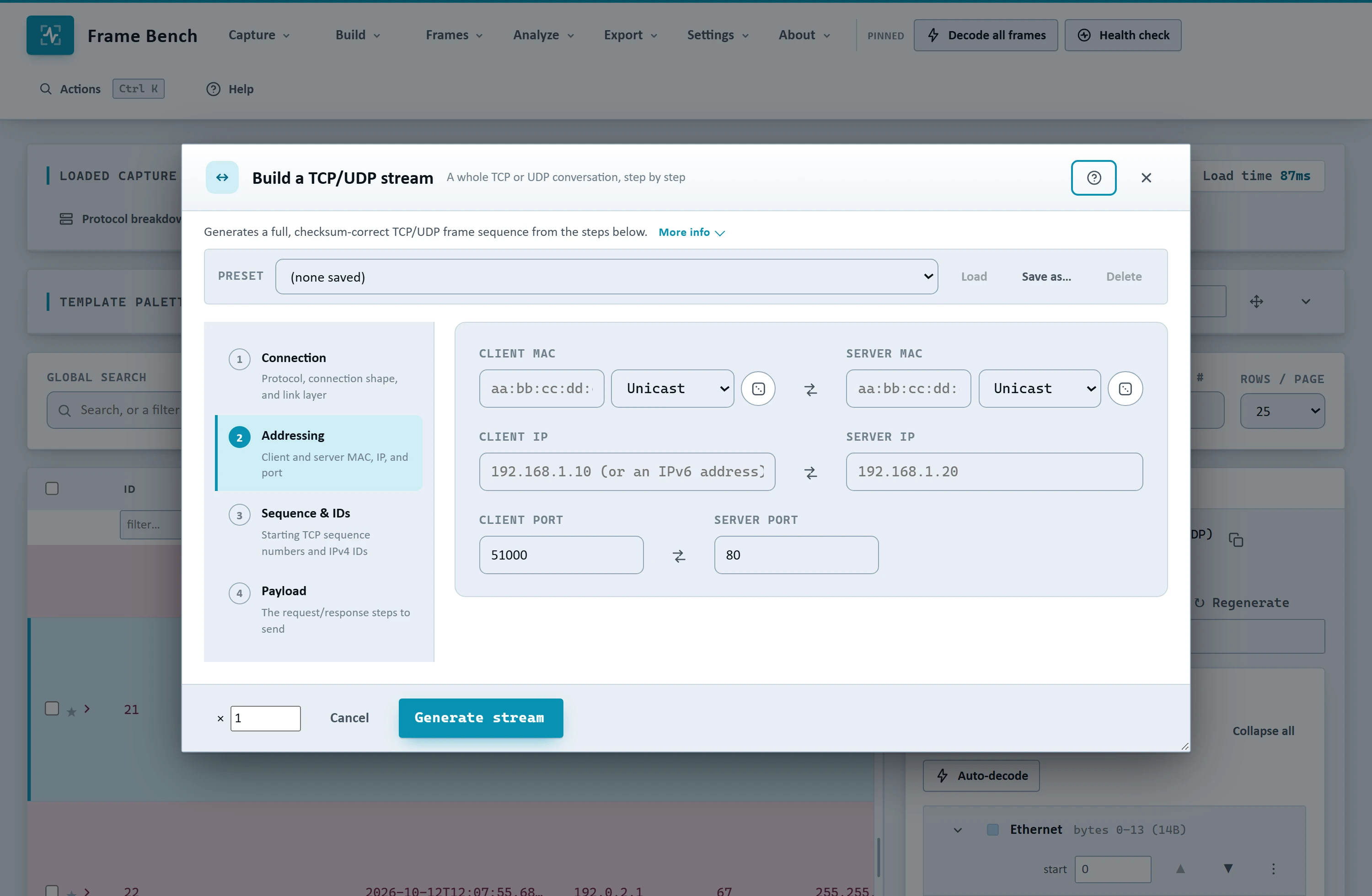
The Craft lab goes further:
Expressions write a frame in a layered notation, and Stream expressions describe a whole connection in one line.
Series turn one template with placeholders into a hundred frames, such as a port sweep, and Infer from frames works backwards from captured frames to the template that produced them.
Mutate and fuzz takes one real frame and makes variants, with bits flipped, bytes replaced, or boundary values set in a single decoded field, for testing how a parser or an IDS copes with malformed input.
Scenarios are whole, realistic exchanges from one click: ARP, DHCP, DNS over TCP, SMTP, FTP, WebSocket, HTTP/2, TLS handshakes, scans and more, with optional network trouble. A TCP stream can lose its first segment and be resent after a timeout, deliver one segment twice, swap two segments, or have a receiver that closes its window. Every frame is previewed, with its time and direction, before you generate it.
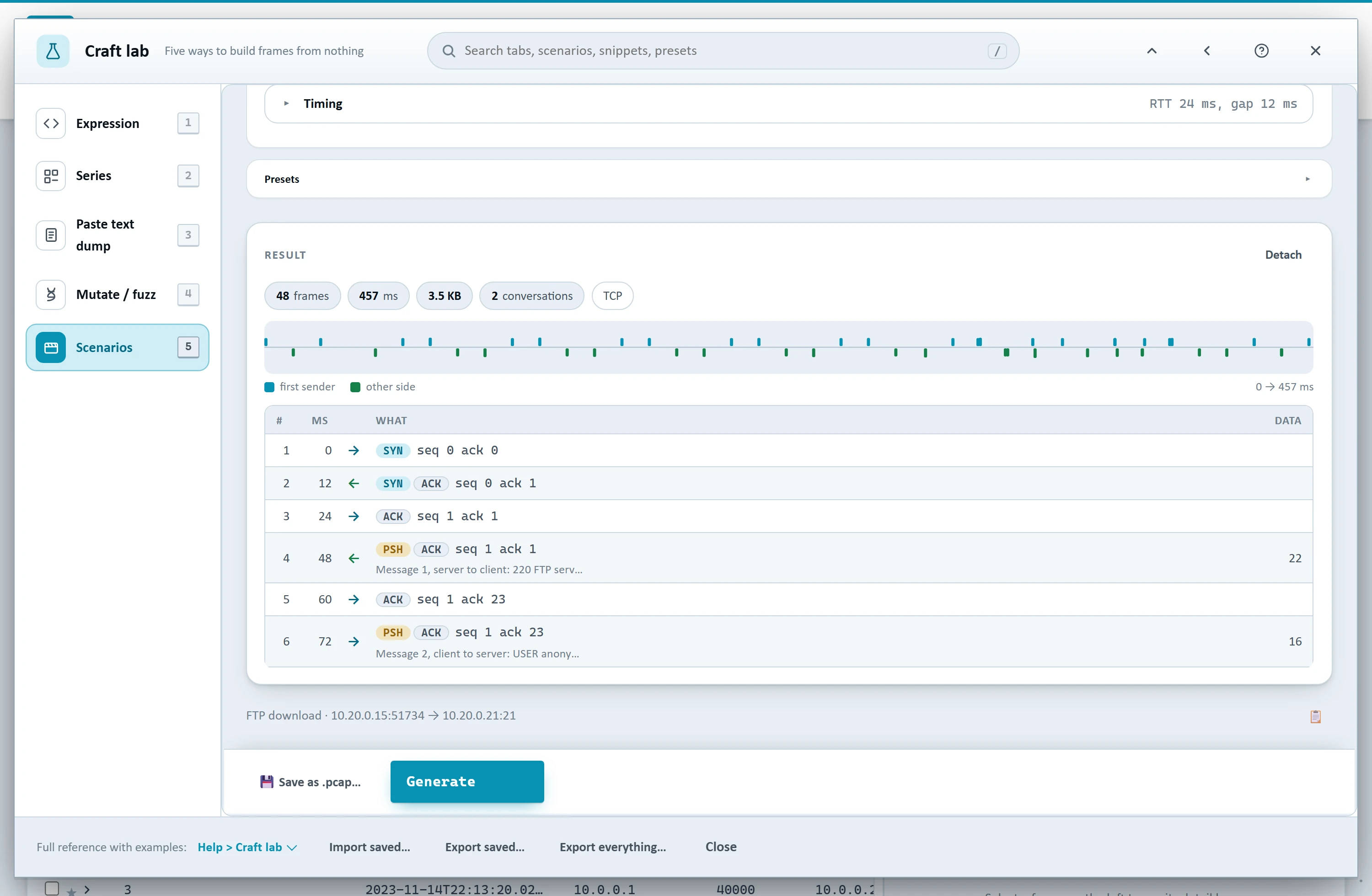
Lengths, checksums, sequence numbers and timestamps are worked out for you everywhere, and the result is always real frames in the table that you can inspect, edit, save as a pcap, or send on.
Decrypt TLS, DTLS and QUIC
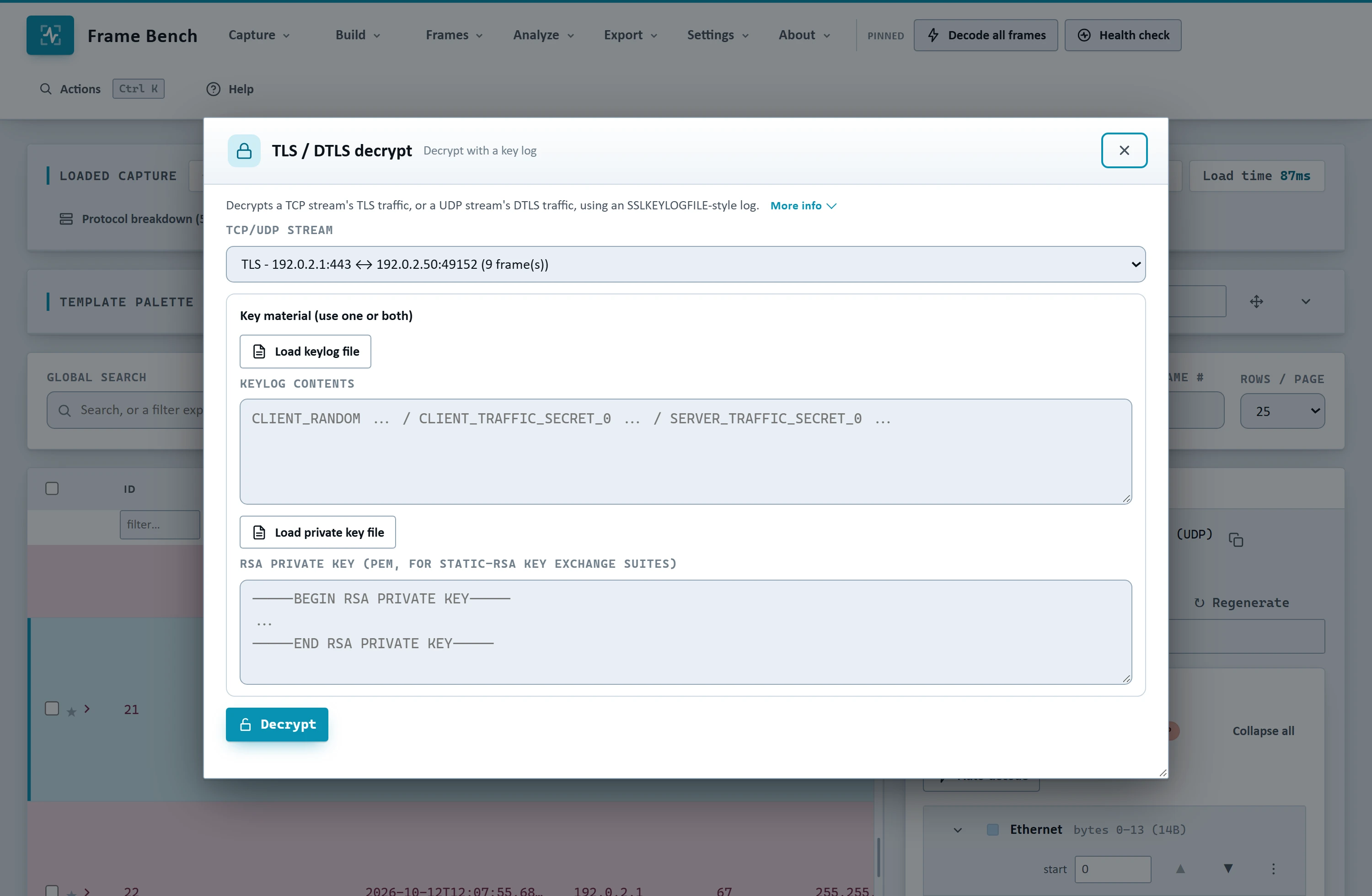
Give Frame Bench the key log your browser wrote and it decrypts the matching stream and decodes what is inside: TLS 1.2 and 1.3, DTLS, HTTP/2 over TLS, and QUIC with the HTTP/3 and QPACK headers on top. A .pcapng that carries its own decryption secrets fills the key log in for you. Read the requests and responses on screen, then save the decrypted traffic as a pcap, or load it back into the table beside everything else.
Private by design
Packet captures hold credentials, tokens and customer data. Frame Bench is built on the assumption that they must not leave your machine.
Captures, decoded frames, key logs and edits are processed locally and never uploaded.
No telemetry, no analytics, no account, no automatic update check.
The application window runs sandboxed, and the only network requests it makes are a short, complete list that is published on the security page, along with a software bill of materials, so a security review does not need a questionnaire.
Sending frames onto a network is off until you turn it on, and it asks you to confirm each send.
If you work in a place where nothing may talk to the internet, ask us about an offline license: it never makes a network request at all. Offline licenses are issued at our discretion, so get in touch.
Licenses that stay out of your way
Frame Bench is licensed in three tiers, so you pay for the part of the job you do:
| Tier | What it includes |
|---|---|
| Analyst | Decoding and byte editing with undo and redo, Expert findings with adjustable thresholds and reports, the Health check, Streams, Conversations and Hosts and ports, building frames by hand from the template palette, the Craft lab one frame at a time, Batch apply and Rewrite addresses, and reading decrypted TLS, DTLS and QUIC with a key log. |
| Crafting | Everything in Analyst, plus the guided packet builders, Craft lab series, mutate and fuzz and Stream expressions, and sending frames onto a network. |
| Complete | Everything in Crafting, plus saving decrypted traffic as a pcap and loading it into the table, Craft lab scenarios and packs, your own Expert findings rules (and reading rules from a shared folder), and priority support. |
Every tier includes a year of updates and standard support.
A license is a signed text file we email to you. You activate it once with a single connection to our server, and after that Frame Bench checks the date at each start, and keeps working for a few days if it cannot reach us. A license covers a number of computers, and removing it in the app frees the seat for another. You choose the license period, one year at the minimum, and it includes support, updates and new releases.
If every seat is taken the activation screen says so, shows the License ID, and gives you a ready-made message to send to support.
What you need
Windows: 64-bit Windows 10 or 11.
Linux: a recent 64-bit desktop distribution, such as Ubuntu 22.04 LTS or later. The AppImage runs on most distributions, and there is a
.debpackage for Debian and Ubuntu.Memory and disk: about 4 GB of memory (8 GB or more for large captures) and 300 MB of free disk space.
Optional: Npcap on Windows or libpcap on Linux, only if you want to send frames onto a network. Everything else works without them.
There is no 32-bit, ARM or macOS build yet. macOS is coming.
Getting started
Get a license. Request one, or ask for an evaluation.
Download the installer from the customer downloads page with your license. Each file lists its SHA-256 checksum so you can verify it.
Open Frame Bench and load your license file. The first run walks you through the app on a bundled example capture.
Open a capture with Capture, then Upload capture, or drag it onto the window.
Press Ctrl K at any time and type part of what you want to do: the command palette finds every action. The Help guide is built in, and it is also available as a PDF.
Why we built it
We kept reaching for a hex editor, a script and a packet crafting library in the same afternoon, to do what felt like one job on one capture. Frame Bench puts that job in one place, with the checks that make the result trustworthy: lengths that add up, checksums that are right, and a decode you can read next to the bytes.
It is version 1.0, so the list above is where we start, not where we stop. If there is something you reach for in your own work that is not here, tell us.
Frame Bench is a product of Netomize. Questions and security reports: support@framebench.ca.